Unlock Your Creative Projects with a Professional Project Tracker KDP Interior
You have ideas. You have goals. But keeping the momentum on a creative project—from writing a book to planning a business launch—requires more than just enthusiasm. It demands structure. That’s where a professionally designed Project Tracker KDP Interior becomes your secret weapon. This isn't just a template; it’s a tested, ready-to-print framework for organization, offering a clean, functional canvas to track, manage, and ultimately finish what you start.
A Foundation for Organized Creativity
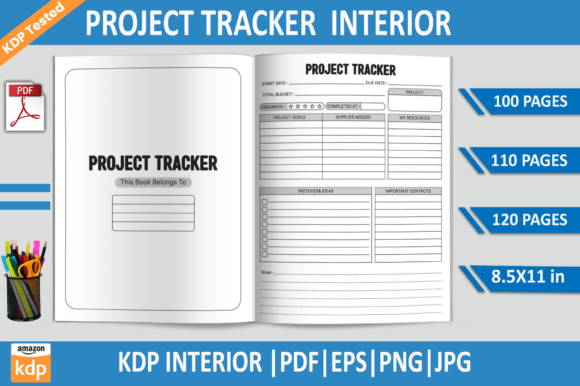
What exactly is the Project Tracker KDP Interior? At its core, it’s a digital product designed for Amazon Kindle Direct Publishing (KDP). It provides the interior pages for a physical notebook or journal you can publish and sell, or use personally. This specific package includes a tested 100-page PDF file, alongside additional 110 and 120 page variants, and fully editable EPS files. The key value lies in its tested practicality: 8.5x11 inch size, 300 DPI quality, no bleed, and KDP-approved formatting. It’s a hassle-free, print-ready foundation.
But its true usefulness extends far beyond its technical specifications. This interior offers a structured layout dedicated to project tracking. Think of it as a dedicated command center for any undertaking. By providing a consistent space to log milestones, deadlines, resources, and progress notes, it transforms abstract plans into tangible, actionable steps. For creators and entrepreneurs, this structure is often the missing piece that bridges the gap between a great idea and a finished product.
Adapting the Tracker for Your Unique Goals
The beauty of the Project Tracker KDP Interior, especially with the included editable EPS files, is its incredible adaptability. Its clean, professional design serves as a starting point, which you can tailor to suit nearly any project type or audience.
For Authors and Content Creators
Writers can use it to track a novel’s chapter progression, character development timelines, or research notes. A blogger planning a series can map out post schedules, keyword targets, and promotional activities. The pages become a visual timeline of the content creation process, helping to maintain consistency and pace. By using the editable files, you can even add custom headers or section prompts specific to your genre.
For Entrepreneurs and Small Business Owners
Launching a product or service involves countless moving parts. This tracker can be adapted as a launch calendar, a budget progress log, or a task delegation sheet. Marketing campaigns, website development phases, and client onboarding processes all benefit from a centralized tracking system. The high-resolution JPG and PNG files allow you to even extract elements for digital dashboards or presentation materials.
For Educators and Course Developers
Designing a curriculum or an online course requires meticulous sequencing. Each page of the tracker could represent a module, with space to track learning objectives, resource gathering, assignment creation, and production status. This physical, printable format offers a tactile overview that digital tools sometimes lack, perfect for brainstorming sessions or team collaborations.
For Hobbyists and Personal Project Managers
Creative hobbies, from building furniture to planning a complex garden layout, are projects in their own right. The tracker can log material inventories, sketch iterations, and phase completions. It encourages a methodical approach to passion projects, increasing the likelihood of a satisfying, finished result.
Practical Applications and Stylistic Approaches
Moving beyond basic adaptation, consider how you can interpret the layout to serve different functional styles. The clean slate invites you to define your own tracking methodology.
- The Chronological Log: Use each page, or set of pages, for a week or month. Record daily progress, obstacles, and insights. This creates a linear narrative of your project’s journey, invaluable for post-project review.
- The Modular Dashboard: Divide the tracker into permanent sections across many pages: one area for finances, one for tasks, one for contacts, one for creative notes. This gives you a holistic view every time you open the journal.
- The Iterative Development Grid: Perfect for designers and developers. Map out versions or iterations of your work. Track changes, feedback, and refinement steps for each cycle, using the structure to ensure no idea or critique is lost.
When customizing, keep results clear and audience-friendly by maintaining visual consistency. If you're publishing this interior for sale on KDP, your audience will appreciate a logical flow. Use clear headings, ample white space (preserved by the professional design), and a limited color palette if you modify the editable files. The original 300 DPI quality ensures any additions you make in Illustrator will remain sharp for print.
From Foundation to Finished Product
Having the Project Tracker KDP Interior files is the first step. The next is implementing them effectively. Start by defining the single, core purpose of your tracker. Is it for financial tracking, timeline management, or idea generation? This focus prevents it from becoming a cluttered catch-all. Then, establish a simple ritual—a weekly review session where you update the pages. This consistency turns the tool into a habit.
For those publishing on KDP, consider your target buyer. A student might need a tracker for academic thesis planning. A freelance graphic designer might need one for client project management. Your description and customizations should speak directly to that user’s pain point: the feeling of being overwhelmed by unorganized tasks. The fact that this interior is KDP tested and includes multiple file formats is a practical benefit you can highlight, assuring buyers of its technical readiness.
The included EPS file is your gateway to originality. With Adobe Illustrator, you can not only modify text but also introduce subtle graphic elements—icons for different task types, light color-coding for priority levels, or custom header fonts. Remember, the goal is enhancement, not overcrowding. The underlying professional layout is designed for functionality; your edits should serve that same purpose.
A Tool for Momentum, Not Just Memory
Ultimately, the Project Tracker KDP Interior is more than a record-keeping device. It’s a momentum engine. By externalizing your project’s details onto a well-designed, physical or printable format, you reduce cognitive load. You free up mental space for the actual creative or strategic work. Seeing progress documented across pages provides motivation; seeing stalled areas highlighted prompts corrective action.
Whether you use it as a personal tool to finally complete that passion project or as a commercial product to help others organize their endeavors, its value is rooted in tested practicality. It offers a structured starting point from which your own organization—and creativity—can reliably grow.